Stocks require liquidity or momentum to push them one way or another, creating the sort of outsized returns that traders are looking for. The momentum that will push prices lower or higher is driven by volume. While there are many different volume indicators, for example, on-balance volume or OBV, there is only a very small number that will combine volume and price to show you who is in control of the market at any given time. This is the volume-weighted average price, which is also referred to as VWAP.
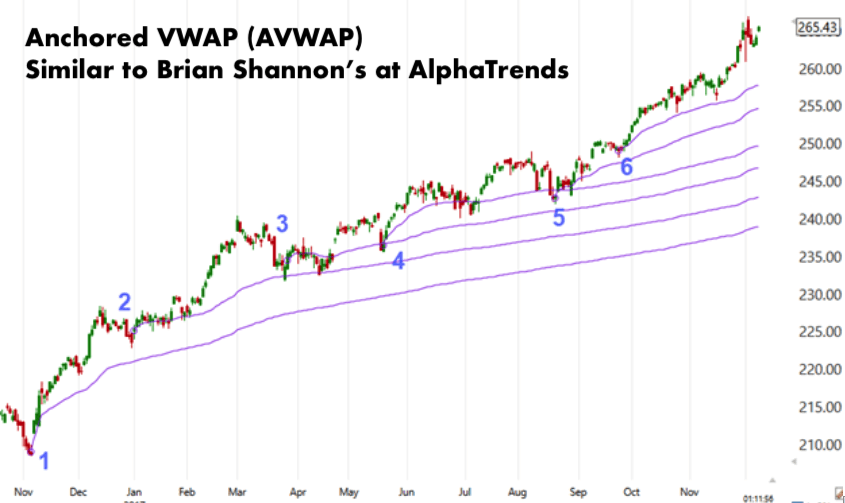
AlphaTrends Anchored VWAP
If you are looking to take your trading to the next level, you may want to consider using the AlphaTrends anchored VWAP to find dynamic support & resistance. This is a popular indicator that both algorithmic and short-term traders use. While it may appear similar to a moving average, volume is factored into the equation with VWAP, ensuring there is improved insight into movements in the market. THE VWAP indicator tends to be drawn as a solo line on a daily or intraday chart. You can easily see example photographs of this if you take a look online.
So, How do You Calculate VWAP?
Now that you know what VWAP is and why it is held in such high regard, we need to explain how to calculate it. The good news is that it is not too complicated! There are three key steps.
- The first thing that you need to do is determine the typical price for each period.
- You should then multiply the typical price by the volume.
- The third part of the process is to keep a running total of the volume and total price by applying the formula:
- cumulative TP * V / Cumulative volume. This will enable you to calculate the VWAP.
This calculation will give you a volume-weighted average price for every data point, which you can overlay on the price chart to create an indicator or line.
How can you use VWAP?
There are actually a number of different ways that VWAP can be utilized.
- If you are a short-term trader, you may want to utilize VWAP to figure out if the price is oversold or overbought, as well as to evaluate the trade fills. Should a long trade be filled above the VWAP, it could indicate that the trader has gotten a subpar fill.
- Another way that we see VWAP being used is by institutional traders to move in and out of stocks with a minimal impact on price. For instance, you may decide to purchase below the VWAP and sell above it, ensuring the price is pushed back to an average, instead of being pushed away from it, therefore, maintaining a market that is orderly.
These are just two of many different ways that VWAP can be used. We hope that this has helped you to get a better understanding of VWAP and why it is so important for traders today. It can help you to take your trading to the next level.
Want to take your trading to the next level with VWAP? Click here to learn more.