This indicator is a custom quote column for your sidebar watchlists, MarketWatch quote screen, or Stock Hacker results screen in ThinkOrSwim. This column allows you to sort and rank stocks or other instruments by the percentage that they have retraced or reclimbed f
Find out more and download the indicator here: http://easycators.com/product/thinkorswim-reclimb-indicator-custom-quote-column/
This video describes how to install custom indicators, scans, and quote columns into ThinkOrSwim, either with shared item links, or with the actual code, or with STUDY.ts files.
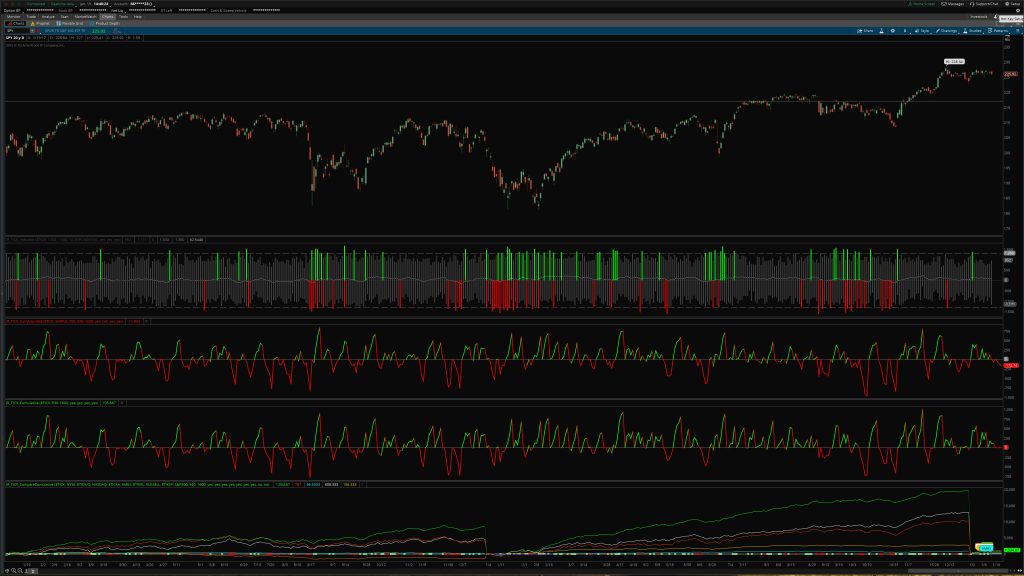
Awhile back I posted the Cumulative TICK indicator on the downloads page, but after experimenting around with it for the past several days I wanted to do some updates and improvements. So I’ve just posted the new code on the site and anyone who has downloaded it before will have immediate access to the new code and the new features. I always want to make sure I offer a good product and good value, so your feedback is important to me. Please let me know in the comments if there are any additional features you are looking for and I’ll see if I can incorporate them in the next version. I’m always programming something, so usually it doesn’t take too long for me to improve things.
What’s New
So first of all, I realized that the old indicator didn’t seem to work properly on certain instruments and timeframes due to data peculiarities in TOS. So I fleshed out the code to account for those situations, and now the indicator works on futures like the E-mini S&P 500 as well as stocks and ETFs. And it also works on any timeframe … monthly, daily, hourly, etc. Originally it had only worked in the way Dr. Brett Steenbarger originally used it and talked about it on his blog. But I realized a lot of traders would probably adjust it to their own trading styles, so I wanted it to work for every situation possible. And now it does that.
Second, to make it useful on long-term historical charts, I wanted to add some features. Normally, since the market rises generally over time, the cumulative TICK just keeps growing and growing. The adjusted cumulative TICK fixes part of that by subtracting a moving average to turn the output into more of an oscillator. But on long-term charts that still didn’t fully solve the ever-growing graph problem. What I needed was a “reset” function for long-term charts the same way intraday charts reset at the beginning of each day. So what I did was add the option to have it reset each year, month, or week. Each of these can be independently set.
Third, I’ve added the ability to choose your own average type and length for the Adjusted Cumulative TICK.
New BONUS Indicator: TICK Extremes Indicator
This is an indicator that a lot of traders use to fade high and low TICK extremes. I’ve tried to make it really easy to customize by letting you show or hide the zero line, average line, and extreme levels. You can choose what levels you want to use based on whether you’re on a long term chart or a short term chart. And you can set the average type and length as well. All the colors and graph types are customizable as well.
New BONUS Indicator: Comparative TICK Indicator
I’ve seen traders use this in other platforms, and I had some time to kill so I thought I’d see what I could do with it in TOS. Essentially this indicator lets you look at multiple cumulative TICKs at the same time and compare how different markets are behaving relative to each other. So you might compare the NYSE TICK to the Nasdaq TICK, S&P 500 TICK, Dow TICK, etc. The automatic comparison line lights up green when all the TICKs are up-ticking, and red when all the TICKs are down-ticking. You can literally type in any comparison TICK symbol available in Thinkorswim.
The complete list of TICK symbols is listed here for easy access:
$TICK – NYSE
$TICK/Q – Nasdaq
$TIKA – Amex
$TICKAC – Amex composite
$TICKAR – ARCA
$TICKARC – ARCA composite
$TICKC – NYSE composite
$TICKC/Q – Nasdaq composite
$TIKI – DJIA
$TIKIC – DJIA composite
$TIKND – Nasdaq 100
$TIKNDC – Nasdaq 100 composite
$TIKRL – Russell 2000
$TIKRLC – Russell 2000 composite
$TIKSP – S&P 500
$TIKSPC – S&P 500 composite
$TIKUS – All USA
$TIKUSC – All USA composite
Summary
So just as a quick recap, the cumulative TICK indicator set has been improved and updated with the following new features:
Works on all instruments
Works on any time frame
Custom yearly, monthly, weekly reset function to make it useful on long-term charts
Choose your own average type and length for the adjusted cumulative TICK
Set a custom closing and opening time if desired
New TICK extremes indicator lets you fade high and low TICK readings
New comparative TICK indicator lets you see how the different markets are doing relative to each other
This set comes with 4 separate thinkScripts. It includes the basic Cumulative TICK indicator, the Adjusted Cumulative TICK indicator, the TICK Extremes Indicator, andthe Comparative TICK indicator.
You can check out the screenshots, video and description of the Cumulative TICK indicator here.
Josiah is a stock & futures trader, ThinkScript programmer, Bitcoin maximalist, gold bug, real estate investor, and budding mountaineer. He's also rumored to be an in-shower opera singer. Josiah started Easycators in 2014 and lives with his family near Nashville, TN. xTwitter | YouTube
This website uses cookies to improve your experience. We'll assume you're okay with this, but you can opt-out if you wish. Accept | Read More
Privacy
Privacy Overview
This website uses cookies to improve your experience while you navigate through the website. Out of these, the cookies that are categorized as necessary are stored on your browser as they are essential for the working of basic functionalities of the website. We also use third-party cookies that help us analyze and understand how you use this website. These cookies will be stored in your browser only with your consent. You also have the option to opt-out of these cookies. But opting out of some of these cookies may affect your browsing experience.
Necessary cookies are absolutely essential for the website to function properly. This category only includes cookies that ensures basic functionalities and security features of the website. These cookies do not store any personal information.
Any cookies that may not be particularly necessary for the website to function and is used specifically to collect user personal data via analytics, ads, other embedded contents are termed as non-necessary cookies. It is mandatory to procure user consent prior to running these cookies on your website.